PH-CU-S | AI Code PRO | ID Code PRO
EN | RU
PRO LICENSE Lifetime • Up to 3 Computers

ID Code PRO Activation Key

Lifetime license with full access to all future updates. Unlocks organic QR module shapes, custom logo cutout directly from document ([QR_shape]), logo auto-tuning and margin safety offset, ultra-fast Excel batch processing with photo placement (#img1, #img2), duplex 4+4 and bilingual 1+1 card modes, built-in barcode scanner from clipboard and selection, pure vector CMYK EPS without rasterization, and all 18 1D vector barcode standards.

🌐 Device Management 🔑 Offline Activation
LATEST BUILD Version: v3.02.76

Download Latest Version

Enter your license key to verify and instantly obtain your personal download link for the latest ID Code PRO release.

Version history and changelog for ID Code PRO:

Version 3.02.76

🛠️ Fixed

  • Enhanced BusinessCardImposer Companion Installer on macOS (Sequoia 15.x / Sonoma 14.x):
  • Automatic creation of Scripts Panel folders in InDesign preference paths even if scripts were never previously installed.
  • Multi-path detection across User Preferences, Application Support, and /Applications.
  • Mandatory bundling and verification of BusinessCardImposer in all distribution archives.

Version 3.02.75

✨ Added

  • Business Card Imposition Companion Integration (BusinessCardImposer):
  • Automatic deployment of BusinessCardImposer.jsx into InDesign Scripts Panel during installation.
  • Intelligent document scanning: automatic detection of employee cards by frame names and templates.
  • Selective gang-run cart (Print Order Cart) with customizable print runs (pcs) per person.
  • 4 smart imposition strategies: Sheetwise (all-in-one form), Grouped runs (high + low quantities), Isolated Pools (24 per sheet), and Manual Hybrid (interactive brush/eraser grid allocation with auto-plan).
  • Order approval proofs: digital email/PDF proof card and printable sign-off proof sheet (Approval Proof) with client signature block.
  • Automatic 4+4 duplex press sheet assembly on SRA3 with crop marks, bleeds, and slug line info.
  • Smart 1-Click Data Layout (Superior to InDesign Data Merge):
  • Interactive tag placement by clicking field badges in Data Viewer: if nothing is selected, plugin auto-creates a neat text frame with the tag right on the active page.
  • Prefix preservation: when selecting a frame with an existing prefix (e.g., "No. " or "Tel: "), the tag is smartly appended without overwriting the prefix.
  • Automatic handling and restoration of frame and layer locks during insertion.
  • Universal encoding auto-detection for Excel/CSV exports (Windows-1251 and UTF-8) with preservation of regional symbols (such as "№").
  • ExtendScript engine resilience and isolated global function exports.

Version 3.02.72

✨ Added

  • Ruler Units Persistence & Quick Reset:
  • Added default horizontal and vertical ruler unit selectors (mm, points, inches, pixels, etc.) to the general settings panel (⚙️ icon) with persistent storage.
  • Automatic detection and adoption of document ruler units on the very first launch.
  • Added quick reset button "↺ Units" to the code type bar to instantly restore configured ruler units in 1 click.
  • Guaranteed unconditional restoration to preferred ruler units after all generation tasks (barcodes, QR codes, batch templates, silhouette clipping) and when undoing operations.

Version 3.02.71

🛠️ Fixed

  • Vector Silhouette Engine: added intelligent v3 algorithm ("Clipart & White BG") for precise vector and raster logo clipping on colored backgrounds.
  • LOG Button: excluded automatic silhouette generation on logo registration; fixed auto-scaling button freeze.
  • QR Code Finder Patterns (Eyes): fixed inversion in native vector mode; ensured clean compound polygon cutout with filled center module.

Version 3.02.70

✨ Added

  • Installer Optimization: clean native installer with standard hardware GPU acceleration for InDesign 2020–2026+.
  • Overall extension stability, module reliability, and core engine performance improvements.

Version 3.02.69

✨ Added

  • Custom Shape Cutout (From Doc [QR_shape]): use any complex InDesign vector path as a logo cutout mask with true safety margin (Offset Path).
  • Intelligent Logo Auto-tune: adaptive search for maximum logo size with 3-engine verification and safety backoff zone (13%).
  • Precise Scale & Nudge Tuning (↔, ↕): fine-tune raster logo dimensions and micro-positioning on X/Y axes in 1% increments.
  • Full Excel (.xlsx) and CSV/TXT import with arbitrary fields and 1-click tag insertion.
  • Duplex 4+4 and bilingual business card modes (1+1 Front/Back) with alternating rows.
  • Automated linked image insertion (#img1, #img2) into layout frames.
  • Ultra-fast Embed EPS (CMYK) engine: 50 double-sided cards (100 pages) in 16.8s, 100 cards (200 pages) in 53.8s!
  • 8 UI languages (RU, EN, ES, DE, ZH, JA, PT, FR) with compact typography for 240–260px panels.

⚡ Improved & Optimized

  • InDesign dialog suppression (NEVER_INTERACT) during batch operations.
  • Styled in-app error notification banner replacing blocking alert dialogs.
  • Fixed runtime ReferenceError with EPS background enabled.

Version 3.02.00

✨ Added

  • Pure Geometry Core & Decoupled Adapter v2.0 Architecture for Adobe InDesign CC 2020–2026+.
  • Ruler Units Isolation in Points with scale distortion protection.
  • Support for all 18 global 1D barcode standards: EAN-13, EAN-8, UPC-A, UPC-E, JAN-13, JAN-8, ISBN, ISSN, ITF-14 with Bearer Bars, Code 128, GS1-128, Code 39, Code 25, HIBC, Pharmacode, Codabar, Postnet, Telepen.
  • Built-in ZXing WebAssembly barcode and QR scanner with screen capture.
  • Batch card generation with Duplicate Pages and Master Template Pages layouts.
✨ RELEASE v3.02.69: ORGANIC QR MODULE SHAPES, LOGO CUTOUT, ULTRA-FAST BATCH
ID Code PRO

Professional automation and prepress design extension for Adobe InDesign CC 2020–2026+. Organic QR module shapes, seamless logo embedding with controlled margins, arbitrary Excel/CSV field import, 1-click GUI templating, automatic linked photo placement (#img1, #img2), duplex 4+4 and bilingual 1+1 cards, built-in barcode scanner from clipboard and selection, pure vector CMYK EPS, and extraordinary batch processing speeds.

💧 River Ankh (water drops) 🌊 Rincewind «RUN» 🛡️ City Watch «NOLI TIMERE» 💎 Crown (diamonds) 🌿 Witches «FOLLOW THE RULES» 📖 Librarian «SILENTLY» ⚡ Batch Gen (16.8s / 53.8s tests) 📷 Clipboard & Selection Scanner 1-Click GUI Tagging 18 Barcode Standards CC 2020 – 2026+
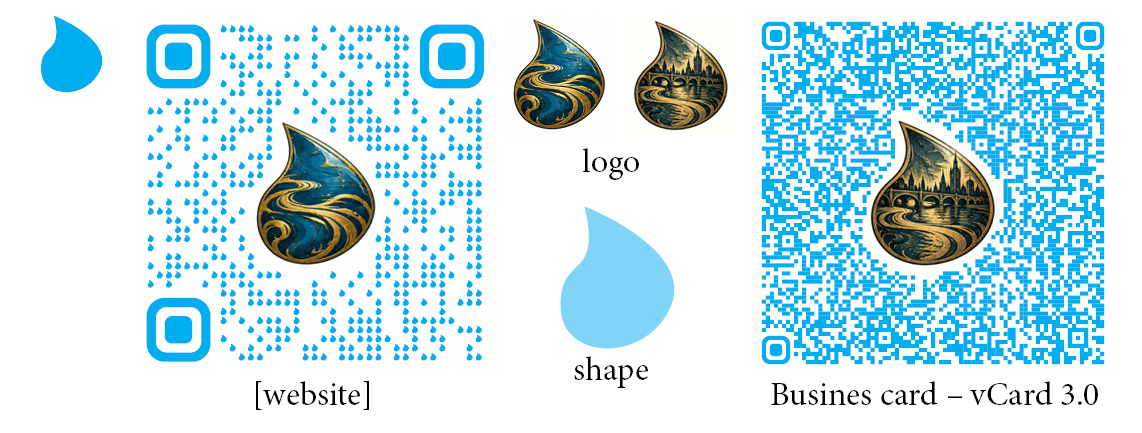
💡 Designer QR Codes Inspired by Sir Terry Pratchett's Discworld: Custom QR module shapes (River Ankh water drops, Rincewind waves, City Watch shields, diamonds, Lancre cauldrons, Librarian books) are especially recommended for concise website links ([website] / URL) and [email]. Crest and logo embedding features an automated vector contour (Offset Path) with precise clearance control from the QR code matrix. For high-density contact cards (vCard 3.0), maximum density is automatically maintained with flawless readability.
QR Element Design & Logo Cutout
💧 River Ankh: Water-Drop Modules & Ankh-Morpork Crest (URL [website] & vCard) 1 / 6
The legendary River Ankh of Ankh-Morpork: custom water-drop module shapes for concise [website] links (URL) paired with a contoured silhouette cutout [QR_shape] around the droplet-shaped logo with river swirls. Controlled safety margin (Offset Path) eliminates module overlap. On the right: adaptation of the same logo for high-density vCard 3.0 contact cards.
HIGH-SPEED BATCH PRODUCTION IN INDESIGN

Duplex 4+4 Cards, EAN-13 Product Labels & Speed Benchmarks

Real stopwatch benchmarks: batch creation of 50 duplex business cards in 16.8 seconds, 100 sets in 53.8 seconds, plus commercial EAN-13 barcode product labels: 50 pages in 34.1 seconds and 100 pages in 84.4 seconds! Automated linked photo binding (#img1), 1-click tag assignment, bilingual 1+1 alternating layouts, and minimal RAM footprint.

Card Template Layout Photo Import #img1 Vector QR & Auto-wrap Speed: 50 Cards (16.8s) Speed: 100 Cards (53.8s) RAM Usage Monitoring 1+1 Front/Back Template 1+1 Batch Result EAN-13 Label Layout Label [BOX] Generation Speed: 50 Labels (34.1s) Speed: 100 Labels (84.4s)
ID Code PRO Batch Generation
Custom Logo Cutout Geometry & Smart Layout Tagging 1 / 12
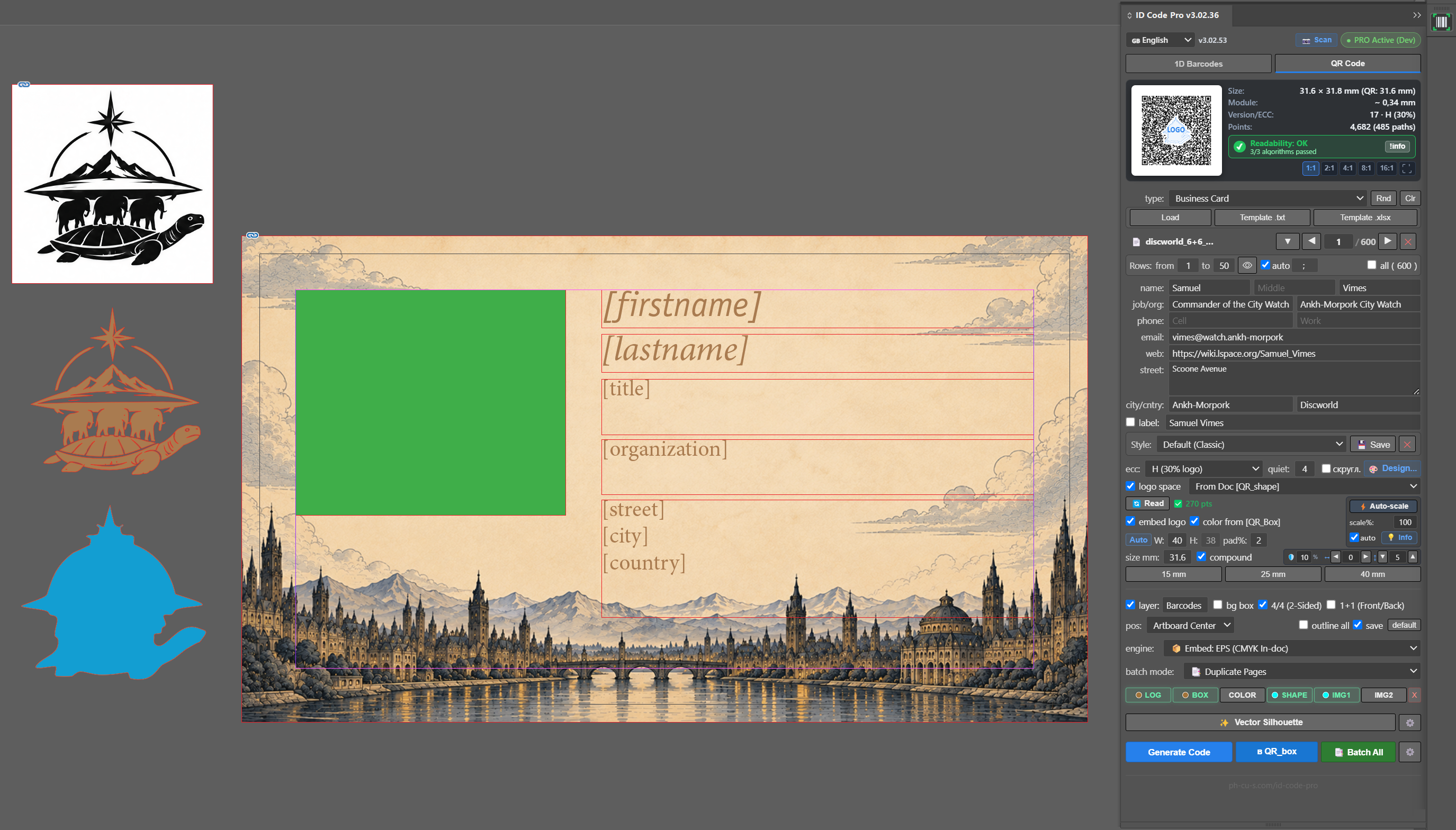
Cutout freedom: draw any vector contour for your logo or badge in InDesign and assign it as [QR_shape] (via the SHAPE button in the panel). The plugin builds a true safety offset path around the shape without overlapping modules. Rapid layout setup: assign the code placeholder [QR_box], company logo [QR_logo], and text variable frames directly from the panel in 1 click.
ARCHITECTURE v3 — MAXIMUM SPEED & FLEXIBILITY FOR INDESIGN

Key Advantages of ID Code PRO

Custom cutout geometry for logos of any shape, direct Excel spreadsheet import, rapid 1-click field layout, automated linked photo placement, duplex 4+4 cards, and phenomenal batch production speed.

✨ Custom Logo Cutout Shape ([QR_shape]) & Auto-tuning

Complete creative freedom integrating corporate brand identity into QR codes directly inside InDesign layouts:

  • Cutout Shape from Document (From Doc [QR_shape]): draw any contour in InDesign (crest, star, shield, or logo silhouette) and assign it via the SHAPE button. The cutout mask traces the path with mathematical precision.
  • Vector Silhouette in 1 Click: automatically unite complex vector groups or trace the opaque silhouette of a raster logo into a single unified closed path.
  • Intelligent Auto-tuning (Auto-tune): the algorithm automatically determines the optimal maximum logo dimensions, verified against 3 independent decoders while preserving a guaranteed reliability margin (Safety Margin 13%).
  • Precise Manual Micro-tuning (Scale% & Nudge ↔, ↕): adjust logo scale and micro-nudge X and Y coordinates in 1% increments right before launching batch production.

📊 Excel / CSV Import & 1-Click Layout Prep (Way Superior to Data Merge)

Lightning-fast layout prep without the rigid constraints and headaches of native InDesign Data Merge:

  • Intelligent 1-Click Tag Insertion: click any field badge (🏷️ [1], 🏷️ [SKU]) in the live Data Viewer:
    • If nothing is selected — the plugin automatically creates a neat text frame with the tag right on your page! You no longer have to manually draw empty frames with the Type tool.
    • If a text frame with a prefix is selected (e.g. "No. " or "Tel: ") — it preserves your prefix and smartly appends the tag, handling frame and layer locks seamlessly.
    • If a text insertion point or range is selected — the tag is placed exactly at the cursor.
  • Universal Encoding Auto-Detection (UTF-8 & CP1251): native InDesign Data Merge notoriously fails or corrupts characters on regional Excel/CSV exports. ID Code PRO detects the encoding automatically and preserves all localized symbols and serial number signs (№, #).
  • Custom Spreadsheet Columns: import Excel (.xlsx) and CSV/TXT files with any column headers (Full Name, Job Title, Department, Phone, Telegram, Website, SKU).
  • Smart Auto-wrap ([; ]): long department names, academic degrees, or business addresses are neatly wrapped at specified delimiters without word truncation.

🖼️ Automated Personal Photo Placement (#img1, #img2)

Personalize employee badges, corporate business cards, and product catalogs with linked image assets:

  • Automated Binding: automatically detects and binds filenames from table columns #img1 and #img2.
  • Arbitrary Geometric Frames: proportional fitting into circular, oval, or rectangular containers [IMG1] and [IMG2] with centering and fill without distorting portrait proportions.
  • Full Prepress Format Support: direct placement of PNG, JPG, EPS, AI, PDF, TIF, PSD, SVG with intelligent search in asset subfolders next to the spreadsheet.

🔄 Duplex 4+4 Layouts & Bilingual 1+1 Front/Back Cards

Complete automation of bilingual corporate stationery from a single consolidated database table:

  • «1+1 Front/Back» Button for Bilingual Cards: alternating odd/even rows. Odd rows (1, 3, 5...) form the front side in English, while even rows (2, 4, 6...) form the reverse side in the localized language. From N table rows, exactly N / 2 complete two-sided card sets are generated automatically.
  • Dual Independent QR Codes per Card: the front [QR_box] encodes an international vCard in Latin characters, while the back [QR_box] encodes localized contact details. Both codes are generated independently.
  • Synchronous Population & Batch Cloning: fill the active spread in 1 click or batch-clone paired pages with accurate naming in InDesign's Pages panel.

⚡ Extreme Batch Production Speed (Embed CMYK EPS)

Proprietary high-performance generation engine producing pure PostScript EPS in the CMYK color space:

  • Real Stopwatch Benchmarks:
    • 50 Duplex Business Cards (100 InDesign pages): only 16.8 seconds!
    • 100 Duplex Business Cards (200 InDesign pages): only 53.8 seconds!
  • Zero Memory Leaks: direct vector embedding via the Embed EPS engine avoids overloading the InDesign DOM, preventing freezes and out-of-memory errors.
  • System Dialog Suppression (NEVER_INTERACT): InDesign proceeds without disruptive pop-up alerts during multi-hundred-page batch runs.

🎨 [QR_box] Color Inheritance & 1-Click Role Bar

Accelerating designer workflow with prepress color fidelity:

  • Color from [QR_box] Fill: vector QR code module colors are automatically read from the fill or stroke of the placeholder frame, including process CMYK and spot Pantone swatches in the document.
  • Role Bar [BOX] [COLOR] [LOG] [SHAPE] [IMG1] [IMG2] [✕]: assign layout roles to objects with 1 click without manually renaming layers.
  • 8 Interface Languages: English, German, French, Spanish, Russian, Portuguese, Japanese, and Chinese with automatic responsive adaptation for narrow InDesign dock panels (240–260 px).

18 Vector 1D Barcode Standards in InDesign

Mathematically exact vector bar generation with Mod-10 / Mod-103 checksum calculation, elongated Guard Bars, and full compliance with GS1, ISO/IEC, HIBC, and USPS specifications.

ℹ️ Detailed visual examples and barcode layouts are being prepared and will be included in an upcoming update
Retail (GS1)

EAN-13, EAN-8, UPC-A, UPC-E

Global standards for consumer packaging and POS cash registers. Automated Mod-10 checksum calculation, elongated Guard Bars, and right-hand quiet zone indicator >.

Examples: 4001234567890 (EAN-13), 40123455 (EAN-8), 012345678905 (UPC-A)
Books & Periodicals

ISBN-13 & ISSN

Publishing standards for books and serial publications in InDesign. Automated human-readable top header (ISBN 978-... / ISSN ...) with hyphenated group segmentation.

Examples: 978-5-17-123456-7 (ISBN), 0028-0836 (ISSN)
Shipping & Logistics

ITF-14 (Bearer Bars)

Corrugated carton and shipping pallet identification. Built-in support for protective Bearer Bars as either a fully enclosed rectangular frame or top/bottom plates.

Example: 10012345678907 (14 digits with Bearer Bars)
Universal Logistics

Code 128 & GS1-128

High-density alphanumeric barcode. Automatic code set switching (A, B, C) to minimize code length, with full support for GS1 Application Identifiers.

Examples: (01)04601234567893(10)BATCH123 (GS1-128)
Industrial & Warehousing

Code 39 & Code 25

Classic inventory and parts identification standards. Supports Full ASCII, optional Modulo 43 check characters, and Interleaved 2 of 5.

Examples: *AUTO-PART-99* (Code 39), 12345670 (Code 25)
Healthcare & Postal

Pharmacode, HIBC, Codabar, Postnet

Specialized codes for pharmaceutical packaging control, Health Industry Barcode (HIBC) medical device labeling, and Postnet / Telepen postal routing.

Examples: 131070 (Pharmacode), +A123PROD456/1 (HIBC)
OPTICAL RECOGNITION & VERIFICATION IN INDESIGN

Built-in Barcode & QR Scanner from Clipboard & Selection

Instant decoding of any 1D barcode or designer QR code right inside Adobe InDesign. Capture screenshots directly from clipboard (Ctrl+V), analyze selected objects on layout pages, verify readability with 3 independent engines, insert decoded text directly into layouts, and generate a brand-new vector CMYK EPS barcode in place of the old raster.

📋

From Clipboard (Ctrl+V)

Take a screen snippet (Win+Shift+S on Windows or Cmd+Shift+4 on macOS) or copy a barcode image from any browser — simply press Ctrl+V anywhere in the ID Code PRO panel. The image is decoded instantly in-memory without creating temporary files on disk.

🎯

From Layout Selection

Select any graphic object on your InDesign spread (a client's raster JPEG, linked PDF/EPS, or barcode frame) and click [📷 Scan]. The plugin dynamically exports the selection at up to 450–600 DPI with an isolated Quiet Zone margin.

📝

Direct Text into Layout

The 📝 Text to Doc button in the scan window immediately inserts the decoded data (URL, vCard contact info, barcode digits) at the active InDesign text cursor position, replaces selected text, or creates a tidy new text frame.

🔍 3 Independent Scan Engines Consensus (3/3)

Unlike basic single-engine decoders, ID Code PRO evaluates 3 optical pipelines simultaneously to guarantee print production readability:

  • ⚡ Modern C++ (ZXing WebAssembly): high-performance WASM engine decoding heavily obstructed Reed-Solomon matrices and organic custom QR module shapes.
  • 📱 Mobile / Web (ZXing-js): emulates mainstream consumer smartphone camera optical behavior (iOS / Android).
  • 🏷️ Legacy / Native 1D Scanline: specialized per-pixel decoders for retail barcodes (EAN-13, EAN-8) with Mod-10 checksum validation, simulating retail laser scanners.

🔄 Barcode Recognition & New Vector Generation

A common prepress headache: clients deliver packaging files containing blurry, low-resolution raster barcodes (JPEG/PNG) downloaded from the web with dirty compression and altered bar ratios.

The ID Code PRO scanner reads the barcode from clipboard or selection, detects the barcode standard (EAN-13, Code 128, UPC, ISBN), and extracts its digits into the generator. Clicking "Vector QR" / "Auto-Fill Panel" creates a brand-new 100% pure vector code in CMYK EPS with mathematically accurate bar widths, official OCR-B typography, and Bar Width Reduction (BWR)!

🛡️ Unicode UTF-16 DOM Clipboard engine prevents Cyrillic mojibake and encoding corruption across all operating systems.

✨
"Vectorize" ("Vector Silhouette") Button — Creates Vector Logo Masks for QR Codes The vectorization tool in ID Code PRO (Vector Silhouette) is designed to build a solid vector logo silhouette mask ([QR_shape]) from raster or complex vector artwork. This mask drives the contoured center cutout in the QR code matrix with a controlled safety gap (Offset Path), ensuring reliable scanning while showcasing the embedded brand emblem.

Compatibility & 1-Click Installation

Full support for modern InDesign releases across Windows and macOS. Clean automated installers without manual file manipulation.

🖥️ Windows & Mac

Native support for Windows 10/11 and macOS (Apple Silicon M1/M2/M3/M4 & Intel processors).

Install.bat (Windows)
Install.command (macOS)

📦 InDesign 2020–2026+

Direct support for CEP 10, CEP 11, and CEP 12+ (InDesign 2026+) with automatic ruler unit isolation in Points.

Adobe InDesign CC 2020
... 2024, 2025, 2026+

🛡️ Anti-Erase Storage

Persistent license safety: key is preserved in the user home directory (.idcode-pro) and never erased during uninstallation or updates.

%USERPROFILE%\.idcode-pro
~/.idcode-pro (Mac)

Frequently Asked Questions (FAQ)

How does ID Code PRO differ from InDesign's native QR code generator?

The built-in InDesign tool generates only generic square QR codes one at a time, lacks organic module shapes (drops, waves, shields, diamonds, books), cannot embed corporate logos with safety margin contours ([QR_shape]), cannot perform automated batch assembly from Excel databases with photo linking (#img1, #img2), does not generate 1D barcodes, and lacks bilingual 1+1 card modes. ID Code PRO transforms InDesign into a high-throughput prepress automation workstation.

How is batch generation in ID Code PRO superior to native InDesign Data Merge?

Native InDesign Data Merge is cumbersome to set up, does not support vector barcodes or branded QR codes, frequently crashes on CSV encoding mismatches (like Windows-1251 from Excel), cannot handle duplex 1+1 front/back bilingual workflows, and forces you to manually draw every text frame. ID Code PRO reimagines this entire workflow: it auto-detects encodings, provides 1-click tag placement (auto-creating frames or smartly preserving prefixes like "No. "), embeds barcodes and employee photos on the fly, and ensures fast, efficient batch generation thanks to its direct vector Embed EPS engine.

What is the real-world batch generation speed?

Thanks to its direct PostScript Embed EPS (CMYK) vector engine, ID Code PRO generates 50 double-sided business cards (100 InDesign pages with unique codes and photos) in just 16.8 seconds, and a full industrial run of 100 double-sided cards (200 pages) in only 53.8 seconds!

Which data types work best with organic QR module shapes?

Stylized modules (water drops, waves, shields, diamonds, books) look stunning and guarantee instant optical decoding on concise data payloads: website links (URL / [website]), SMS, and Email addresses. For extensive contact cards (vCard 3.0), the plugin automatically provisions maximum matrix density while maintaining the protective contour around the logo.

How does the bilingual «1+1 Front/Back» business card mode work?

When your Excel spreadsheet pairs records consecutively (odd row = English, even row = second language), the «1+1 Front/Back» mode links these rows and synchronously maps them to the front and back pages of each business card, generating two independent vCard QR codes in their respective languages.

How many computers can I activate with one license?

A single ID Code PRO license permits simultaneous activation on up to 3 of your computers (e.g., office Mac, home workstation, and laptop). You can transfer activations at any time via the Device Management portal.