QuickImpose v2.2 for Adobe InDesign
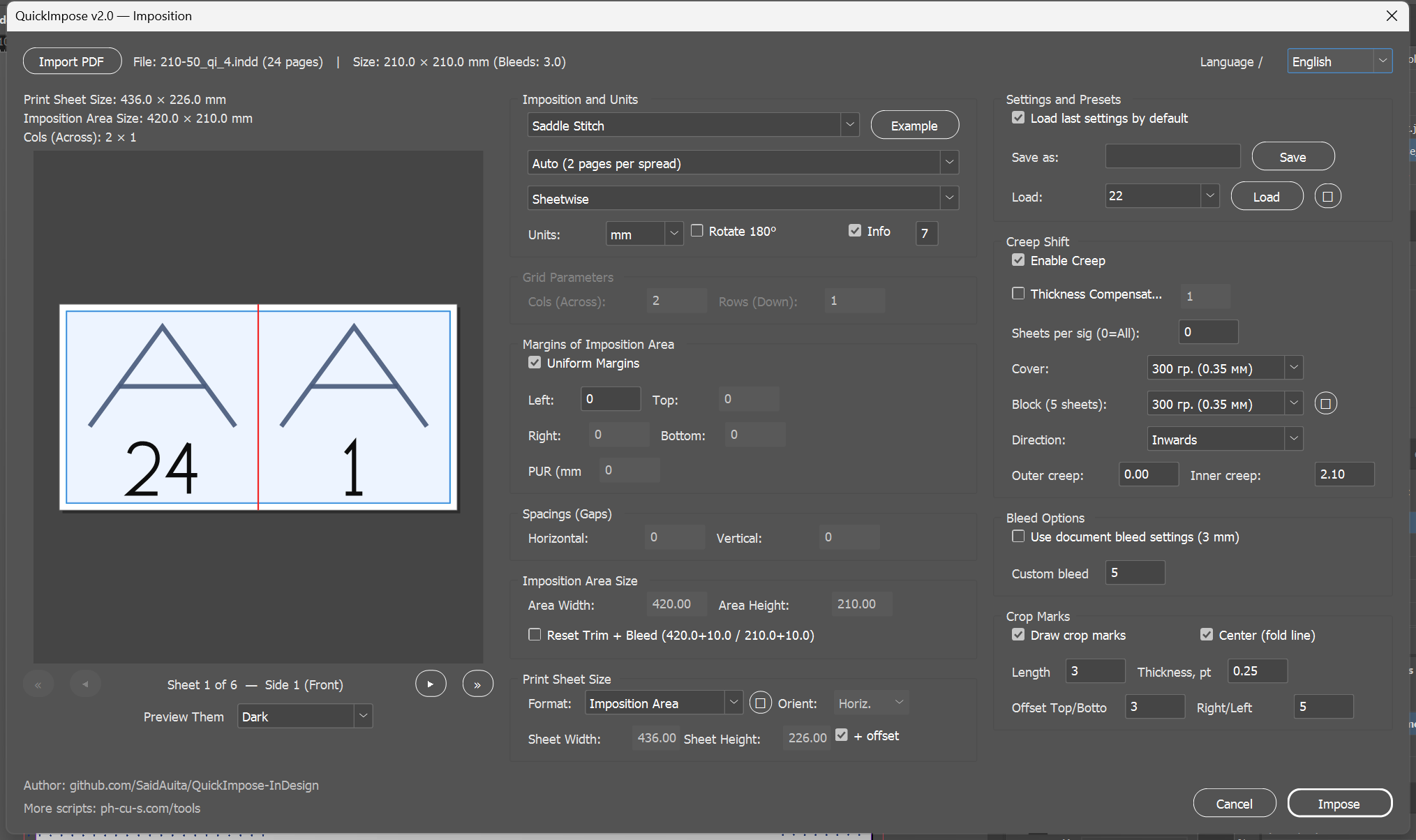
A professional, fast, and feature-rich ExtendScript solution for sheet imposition in Adobe InDesign and PDF documents with real-time interactive canvas scheme preview, PDF export preset integration, PDF import with inset scaling, and 10-language production audit reports.
🚀 What's New in v2.2
- Fit with Inset (Proportional Inner Margins): Proportional inner shrinking of PDF pages into safe margins (default 5 mm / 0.2 in) while preserving outer crop and bleed bounds in
PDF_Import.jsxand the built-in QuickImpose PDF import dialog. - Live Trim & Inset Calculation: Dynamic formula display
(Margin - Bleed = Clean margin)showing exact remaining safe margin after guillotine cutting. - PDF Auto-Rotation Options: Automatic rotation of landscape/portrait PDF pages to match document orientation (Counter-clockwise –90°, Clockwise +90°, or Off).
- Uniform Bleeds After Import: Easy toggle to normalize asymmetric source bleed boxes into uniform document bleed offsets.
Core Features & Imposition Modes
Consolidates advanced imposition functions into QuickImpose_v2.jsx and includes a dedicated high-performance module PDF_Import.jsx for multi-page PDF import and artwork placement.
Comprehensive support for standard commercial print press layouts and binding operations:
Real-time canvas rendering of press sheets, imposition bounds, margins, gaps, page cell numbers, vector orientation marks, and visual PUR spine hinge rendering for book binding.
Automatically imports bleed sizes from the source document. Bleeds are padded dynamically in grid steps to eliminate graphic overlap. Includes Reset Trim + Bleed option to automatically resize flat sheets to booklet trim sizes.
Calculates paper sheet creep shift based on stock weight (integrated PaperWeights.txt database). Cover pages are dynamically shifted outward to compensate for spine thickness.
Easily save, load, and delete saved user presets (🗑) with safety confirmation dialogs. Built-in localization for 10 languages (RU, EN, DE, FR, ES, IT, PT, PL, ZH, JA).
Installation Instructions
- Download the ZIP archive using the download link.
- Unzip the archive on your computer. You will get
QuickImpose_v2.jsx,PDF_Import.jsx,README.md,RESOURCES,Settings, andtest_idml. - Open Adobe InDesign. Open the Scripts Panel by navigating to
Window→Utilities→Scripts. - Right-click on the User folder inside the Scripts Panel and select Reveal in Explorer (Windows) or Reveal in Finder (macOS).
- Copy the
.jsxfiles,README.md,Settings, andRESOURCESdirectory into the opened folder. - The scripts will now appear in your InDesign Scripts Panel. Double-click
QuickImpose_v2.jsx(orPDF_Import.jsx) to launch!
Get QuickImpose v2.2
Download the QuickImpose script package for free. Fully open-source and free to modify under the MIT license for personal or commercial print production.
Download QuickImpose v2.2 (.zip)