InDesign Thread Fix (ID_Thread_Fix)
A specialized, lightweight Windows utility and launcher designed to resolve the infamous 100% CPU thread lock bug in Adobe InDesign (CC 2020 – 2026+).
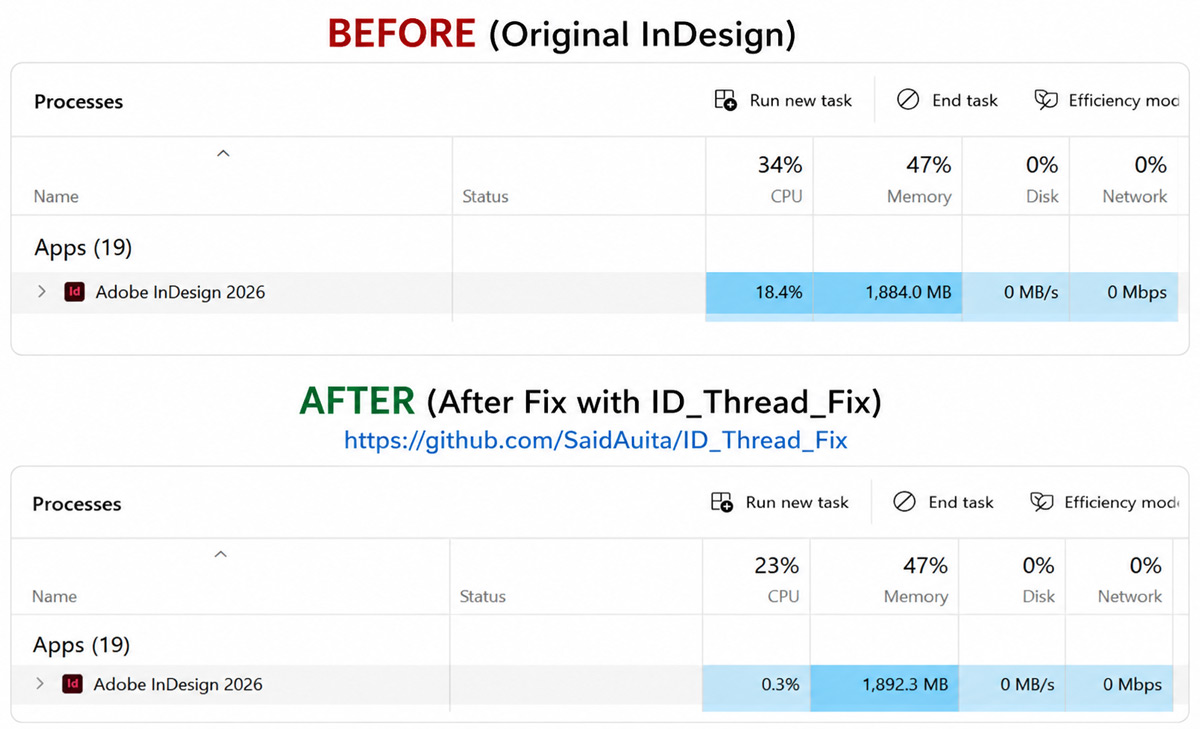
Even when idle, InDesign background worker threads (CEP extensions, CC library syncing, font caching) often get stuck in infinite CPU loops, spinning fans and overheating CPUs. ID_Thread_Fix safely identifies, isolates, and freezes runaway threads via Win32 SuspendThread with zero risk of crashing InDesign.
Key Features and Capabilities
Instead of hazardous termination (which breaks heap locks and crashes InDesign), runaway threads are safely frozen using SuspendThread. CPU load instantly drops to 0% while internal memory structures and critical sections remain intact.
Waits for InDesign's main window to appear, then gives an extra 25 seconds for font table compilation, the Torq layout engine, and CEP/UXP panels to complete initial loading before scanning.
Deliberately protects InDesign's main UI thread (MainWindowHandle) and primary process thread (Threads[0]) from ever being touched.
Replace your standard InDesign desktop shortcut with ID_Thread_Fix.exe. Transparently forwards all arguments and .indd document paths, waits for startup, and automatically stabilizes CPU load.
Optionally runs in the background (via Task Scheduler or startup) to periodically scan and freeze runaway threads every N minutes.
Tiny standalone executable (328 KB) with native .NET Framework support built into every Windows 10/11 system. No installer, no background services, no configuration required.
Download
Supports Adobe InDesign CC 2020 – 2026+ on Windows 10 and 11. Open source on GitHub.
View Source on GitHub Download Standalone EXE (328 KB) Download ZIP Archive (with Docs & License)How to Use
Method 1: Replace InDesign Shortcut (Recommended)- Place
ID_Thread_Fix.exein any folder (or your InDesign folder). - Create a desktop shortcut to
ID_Thread_Fix.exe. - Double-click to start InDesign. It will launch InDesign, forward any opened
.inddfiles, and auto-fix CPU load after startup.
- If InDesign is already open and your CPU fans are running loud, run:
ID_Thread_Fix.exe --fix-only - It will instantly scan and terminate runaway background threads without touching your open documents.