StockAI Tagger
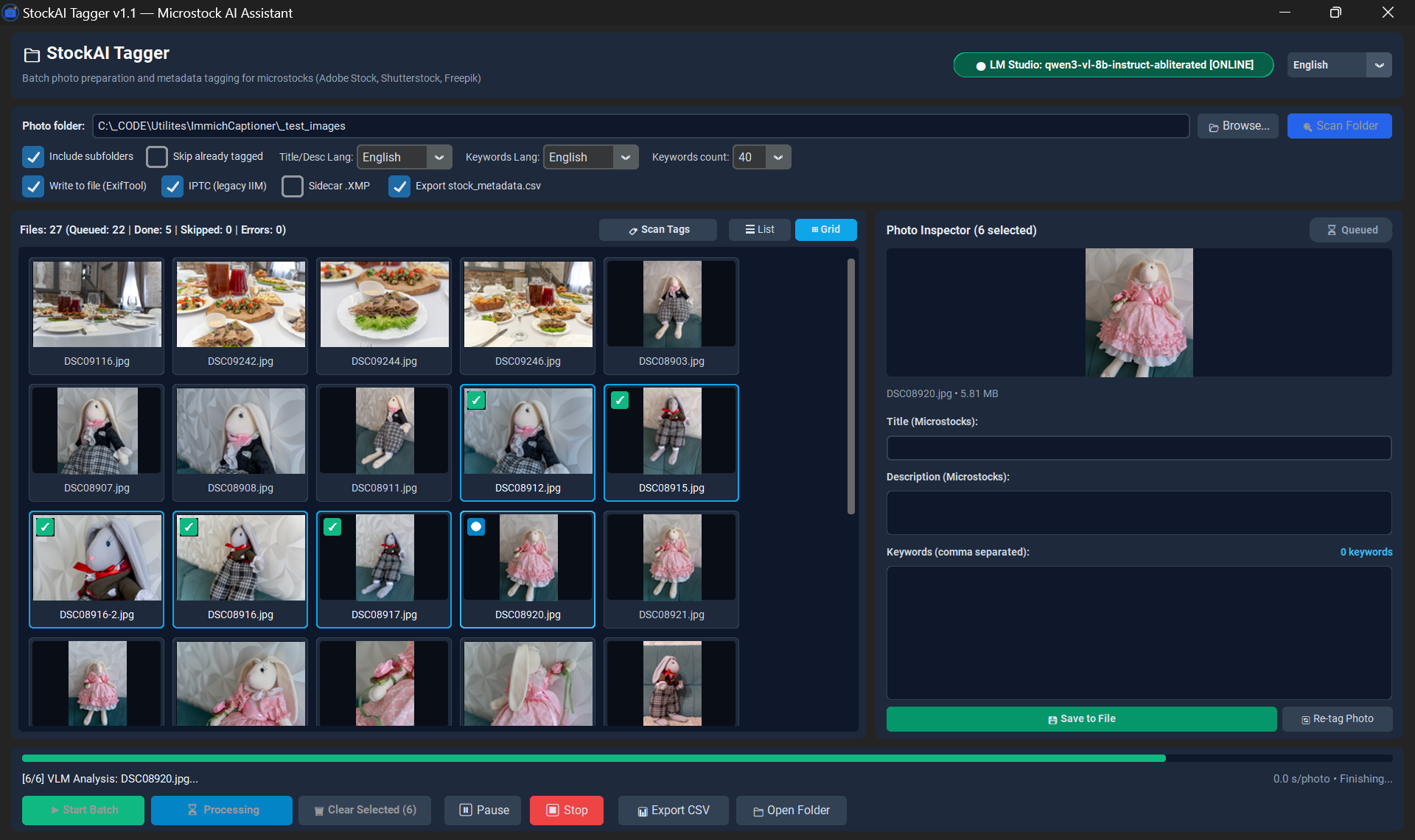
Professional standalone desktop workstation for photographers, vector illustrators, and AI creators: batch AI tagging for stock photography (Adobe Stock, Shutterstock, Getty Images, Freepik) with direct IPTC/XMP metadata embedding via bundled ExifTool.
Completely independent of Immich or cloud servers, StockAI Tagger runs entirely on your local machine using local Vision LLMs (Qwen-VL via LM Studio / Ollama). It crafts concise commercial titles (5–10 words) and strictly 30–50 high-relevance English keywords optimized for microstock search algorithms.
Key Features & Capabilities
Processes local folders containing JPEG, PNG, WEBP, and TIFF files without requiring database connections or cloud accounts.
Seamlessly toggle between a large-thumbnail visual grid with responsive zoom and a granular metadata table with sorting and readiness badges.
Generates concise commercial titles (5–10 words) and 30–50 unique English keywords tailored to pass Adobe Stock and Shutterstock moderation.
Injects IPTC:Headline, IPTC:Caption-Abstract, IPTC:Keywords, XMP-dc:Title, and XMP-dc:Subject directly into image files ready for upload.
The StockAI_Tagger_v1.1_Windows_x64.zip package comes with a bundled standalone ExifTool executable — no manual PATH configuration needed.
Full Shift+Click range selection, Ctrl+Click multi-selection, targeted tagging for selected items, and instant 1-click metadata wipe.
Download
Windows 10 / 11 x64. The complete portable ZIP bundle with embedded ExifTool is recommended.
GitHub Repository Download Full Portable ZIP (~44.0 MB, includes ExifTool) Download Standalone EXE only (~33.9 MB, requires ExifTool in PATH)Quick Start
- Extract
StockAI_Tagger_v1.1_Windows_x64.zipto any directory. - Launch LM Studio with a Vision model (e.g.
Qwen2.5-VL-7B-Instruct) and enable Local Server on port 1234. - Open
StockAI_Tagger.exeand select your media folder. - Select items (or click "Select All") and click "Analyze Selected". Metadata is written directly into your files!